
To help ensure you're importing the required data accurately, you can generate and download an import file that automatically includes all mandatory fields, such as users details and any custom user profile fields relevant to your program. This process simplifies data preparation and reduces the risk of missing critical information during import.
To Download an Example File
- From your Admin Dashboard, navigate to Manage > Users and select Import.
- On the Import a file section, click Import.
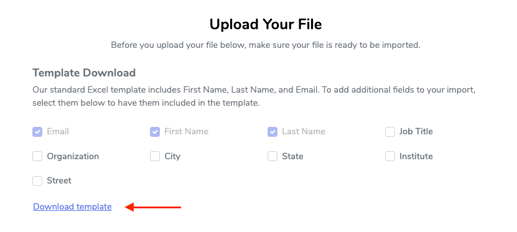
- Choose any additional profile fields to include in your import - First Name, Last Name, and Email are mandatory.
- After selecting your desired fields, click Download Template. This will create a sample file containing both the required and any optional fields you’ve chosen
- Upload the updated file and complete the import.
Learn more about importing users, reviewers and administrators.