
Overview
We’ve introduced updates to improve how you navigate and manage your program settings. These enhancements make it easier to find key areas and keep configurations aligned across
environments.
What’s New
1. Simplified Navigation
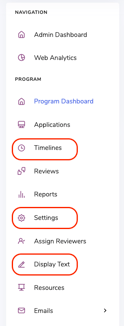
We’ve updated the left-hand navigation to make key areas easier to access and manage.
You’ll now see dedicated sections for:
- Timelines
- Settings
- Display Text
This new structure helps you quickly find what you need without unnecessary clicks.
2. Sync Across Environments
You can now sync key configurations between staging and production and production and staging reducing manual updates and ensuring consistency.
You can sync:
- Settings
- Standard Emails
- Display Text
This makes it easier to manage changes and keep environments aligned.
3. Expanded Settings Experience
Settings have been enhanced to give you more control and flexibility across your program.
-
Overall Program Settings - Configure the core details of your program in one place
-
Email Settings - Manage and configure how your program sends communications
-
Form Settings - Customize how your forms behave and how users interact with them:
-
Review Settings - Configure your review phases and groups in one place
Interactive Walkthrough
Want to see these updates in action? Take a guided tour of the new navigation, sync functionality, and expanded settings experience.
Why This Matters
These updates are designed to:
- Give you more control over your program setup
- Reduce reliance on support for configuration changes
- Help you keep environments in sync
- Improve overall efficiency when managing settings